Device Driver Development
Device Driver in computing refers to a special kind of software program or a specific type of software application which controls a specific hardware device that enables different hardware devices for communication with the computer’s Operating System
A device driver communicates with the computer hardwares by computer subsystem or computer bus connected to the hardware.
Device Drivers are very essential for a computer system to work properly because without device driver the particular hardware fails to work accordingly means it fails in doing a particular function/action for which it has been created.
In a very common way most term it as only a Driver also when someone says Hardware Driver that also refers to this Device Driver.
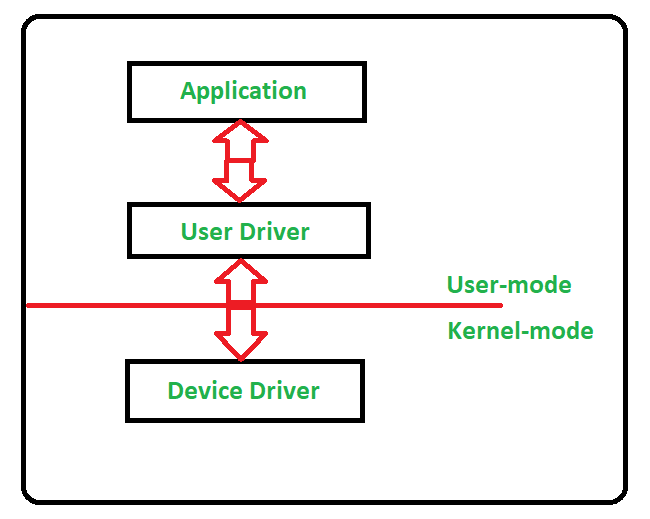
Working of Device Driver :
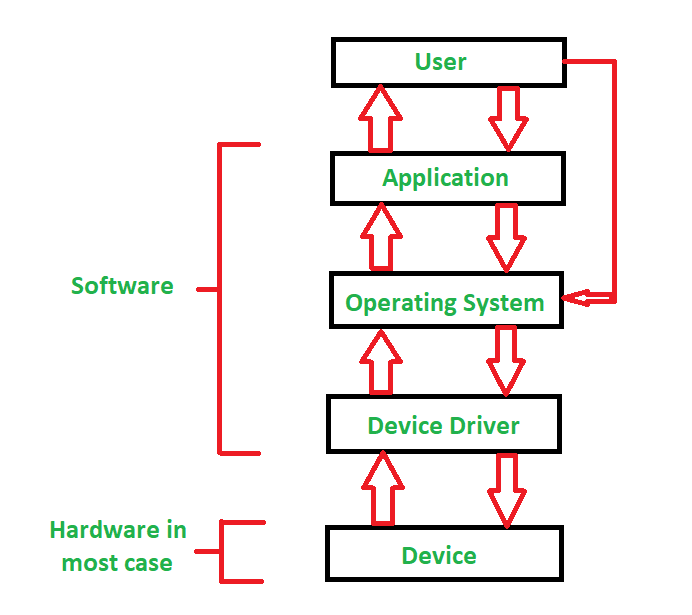
Device Drivers depend upon the Operating System’s instruction to access the device and performing any particular action. After the action they also shows their reactions by delivering output or status/message from hardware device to the Operating system.For Example a printer driver tells the printer in which format to print after getting instruction from OS, similarly A sound card driver is there due to which 1’s and 0’s data of MP3 file is converted to audio signals and you enjoy the music. Card reader, controller, modem, network card, sound card, printer, video card, USB devices, RAM, Speakers etc need Device Drivers to operate.
The following figure illustrates the interaction between user, OS, Device driver and the devices:
Types of Device Driver:
For almost every device associated with the computer system there exist Device Driver for the particular hardware.But it can be broadly classified into two types i.e.,
- Kernel-mode Device Driver –
This Kernel-mode device driver includes some generic hardwares which loads with operating System as part the OS these are BIOS, motherboard, processor and some other hardwares which are part of kernel software. These includes the minimum system requirement device drivers for each operating system. - User-mode Device Driver –
Other than the devices which are brought by kernel for working of the system the user also bring some devices for use during the using of a system that devices needs device drivers to functions those drivers falls under User mode device driver. For example user needs any plug and play action that comes under this.
Virtual Device Driver :
There are also virtual device drivers(VxD), which manages the virtual device. Sometimes we use same hardware virtually at that time virtual driver controls/manages the data flow from different application used by different users to the same hardware.
It is essential for a computer to have the required device drivers for all its parts to keep the system running efficiently.Many device drivers are provided by manufactures from beginning and also we can later include any required device driver for our system.
Prerequisite – Interrupts in 8085 microprocessor
1. Hardware Interrupt :
Hardware Interrupt is caused by some hardware device such as request to start an I/O, a hardware failure or something similar. Hardware interrupts were introduced as a way to avoid wasting the processor’s valuable time in polling loops, waiting for external events.
For example, when an I/O operation is completed such as reading some data into the computer from a tape drive.
2. Software Interrupt :
Software Interrupt is invoked by the use of INT instruction. This event immediately stops execution of the program and passes execution over to the INT handler. The INT handler is usually a part of the operating system and determines the action to be taken. It occurs when an application program terminates or requests certain services from the operating system.
For example, output to the screen, execute file etc.
Difference between Hardware Interrupt and Software Interrupt :
| SR.NO. | Hardware Interrupt | Software Interrupt |
|---|---|---|
| 1 | Hardware interrupt is an interrupt generated from an external device or hardware. | Software interrupt is the interrupt that is generated by any internal system of the computer. |
| 2 | It do not increment the program counter. | It increment the program counter. |
| 3 | Hardware interrupt can be invoked with some external device such as request to start an I/O or occurrence of a hardware failure. | Software interrupt can be invoked with the help of INT instruction. |
| 4 | It has lowest priority than software interrupts | It has highest priority among all interrupts. |
| 5 | Hardware interrupt is triggered by external hardware and is considered one of the ways to communicate with the outside peripherals, hardware. | Software interrupt is triggered by software and considered one of the ways to communicate with kernel or to trigger system calls, especially during error or exception handling. |
| 6 | It is an asynchronous event. | It is synchronous event. |
| 7 | Hardware interrupts can be classified into two types they are: 1. Maskable Interrupt. 2. Non Maskable Interrupt. | Software interrupts can be classified into two types they are: 1. Normal Interrupts. 2. Exception |
| 8 | Keystroke depressions and mouse movements are examples of hardware interrupt. | All system calls are examples of software interrupts |
Interrupt:
Interrupt is a hardware mechanism in which, the device notices the CPU that it requires its attention. Interrupt can take place at any time. So when CPU gets an interrupt signal trough the indication interrupt-request line, CPU stops the current process and respond to the interrupt by passing the control to interrupt handler which services device.
Polling:
In polling is not a hardware mechanism, its a protocol in which CPU steadily checks whether the device needs attention. Wherever device tells process unit that it desires hardware processing, in polling process unit keeps asking the I/O device whether or not it desires CPU processing. The CPU ceaselessly check every and each device hooked up thereto for sleuthing whether or not any device desires hardware attention.
Each device features a command-ready bit that indicates the standing of that device, i.e., whether or not it’s some command to be dead by hardware or not. If command bit is ready one, then it’s some command to be dead else if the bit is zero, then it’s no commands.
Let’s see that the difference between interrupt and polling:
| S.NO | Interrupt | Polling |
|---|---|---|
| 1. | In interrupt, the device notices the CPU that it requires its attention. | Whereas, in polling, CPU steadily checks whether the device needs attention. |
| 2. | An interrupt is not a protocol, its a hardware mechanism. | Whereas it isn’t a hardware mechanism, its a protocol. |
| 3. | In interrupt, the device is serviced by interrupt handler. | While in polling, the device is serviced by CPU. |
| 4. | Interrupt can take place at any time. | Whereas CPU steadily ballots the device at regular or proper interval. |
| 5. | In interrupt, interrupt request line is used as indication for indicating that device requires servicing. | While in polling, Command ready bit is used as indication for indicating that device requires servicing. |
| 6. | In interrupts, processor is simply disturbed once any device interrupts it. | On the opposite hand, in polling, processor waste countless processor cycles by repeatedly checking the command-ready little bit of each device. |
Q1. What is device driver?
Device driver takes a special role in the Linux Kernel. Linux is primarily divided into two parts
1. User Space
2. Kernel Space
There two component interact through system call interface.
Driver may be integrated directly into kernel or can be build separately and plugged in at run time when needed i.e Loadable module
Q2. What are different types of drivers?
1. Chracter Device: Accessed as stream of bytes
2. Block Device: Accessed by file system
3. Network Device
Q3. What is Loadable Kernel Modules?
- Linux has the ability of run time extension which means you can add functionality to the kernel while system is up and running.
- Each piece of code that can be added to the kernel at run time is called a module.
- The module defines two functions: One to be invoked when the module is loaded into the kernel and other when the module is removed.
- module_init() and module_exit() special kernel macros to indicate the role of the two functions.
- MODULE_LICENSE() macro is used to inform the kernel that this module bears a free license.
- printk() is used to display output
- cat /var/log/syslog or dmesg will display your message.
- To build your module, you need to create Makefile which will give the .ko file as the resulting module.
- After Makefile, insmod program loads the module code and data into the kernel
- insmod typically allocate kernel memory to hold the module. It then copies the module text into the memory region.
- rmmod() is used to unload the module from kernel
- lsmod program produce a list of the modules currently loaded in the kernel
- __init and __initdata is used to tell the kernel that function is used only for initialization, it will drop the init function after loading, making its memory available for another use.
Q4: What are Major number and minor number?
- The Major number identifies the driver associated with the device. Kernel uses the major number to invoke the driver.
- The minor number is used by the driver to check exactly which device is referred to.
- Within the kernel, the dev_t type (defined in <linux/types.h>) is used to hold the device numbers- both the major and minor parts.
- Module runs in the kernel space whereas application runs in the user space.
- System calls are interface where user space and kernel space can communicate with each other.
- Code that handles interrupts is asynchronous with respect to processes and is not related to any particular process.
- Some functions in the module are executed as a part of the system calls, and some are in the charge of the interrupt handling.
Q6. How major and minor number can be allocated?
We can allocate major and minor number in two ways:
1. Statically
int register_chrdev_region(dev_t first, unsigned int count, char *name);
dev_t type is used to hold device numbers- both major and minor parts
If you want to create the dev_t structure variable for your major and minor number:
MKDEV(int major, int minor);
To get your major number and minor number from dev_t we can use the below method.
MAJOR(dev_t dev);
MINOR(dev_t dev);
2. Dynamically
int alloc_chrdev_region(dev_t *dev, unsigned int firstminor, unsigned int count, char *name);
Q7. How Application communicate with hardware Device?
First application will open the Device file which is created by Device Driver which we can create in two ways:
Manual: mknod -m 666 /dev/char_device
Comments
Post a Comment